
Qu'est-ce qu'un dispositif BrightSign et comment l'utiliser ?
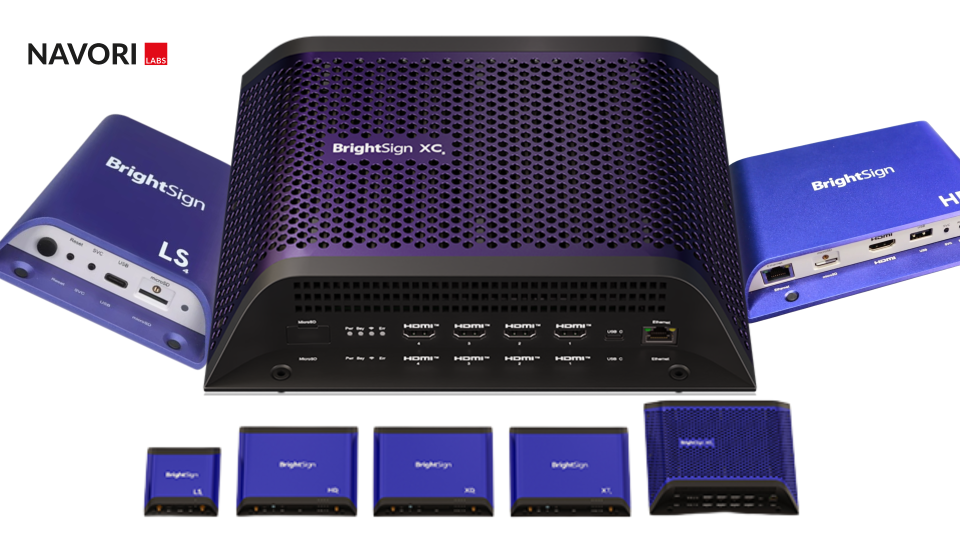
Dans ce guide, nous allons couvrir tout ce que vous devez savoir sur BrightSign. Du matériel, à ce qu'il peut servir, à ce qu'il fait de mieux et quand l'utiliser.
Qu'est-ce qu'un lecteur BrightSign ?
Un lecteur BrightSign est un dispositif violet de petite taille utilisé dans le monde entier pour alimenter les projets d'affichage numérique. BrightSign a été fondée en 2002 et est située à Los Gatos, en Californie. Depuis, l'entreprise a construit et vendu plus de 2 millions de dispositifs matériels abordables et (surtout) fiables pour toute une série de projets d'affichage numérique.
BrightSign série 5
Maintenant mis à jour avec les détails de BrightSign Series 5
À partir de novembre 2022, BrightSign déploiera sa dernière offre matérielle, la série 5 de BrightSign. Cet article a été mis à jour pour inclure de nouvelles informations et fonctionnalités.
La série 5 de BrightSign est conçue pour améliorer l'expérience de l'affichage dynamique. Les modèles XD5 et XC5 de la gamme offrent un ensemble de fonctionnalités encore plus robuste, que nous examinerons plus en détail au début de cet article. Les modèles de la série 5 comprennent actuellement l'AU5, le XD5 et le XC5. Toutefois, pour les besoins de l'affichage dynamique, nous nous concentrerons sur les modèles XD5 et XC5, l'AU5 étant un lecteur audio uniquement.
XD5 (E/S standard ou étendue)
(Starting at $600* for Standard and $700* for the Expanded I/O version)
Successeur du XD4, le XD5 dispose d'une allocation dynamique de la mémoire pour optimiser les performances des graphiques animés. Il permet d'obtenir un contenu encore plus rapide, plus fluide et plus réactif. Capable d'afficher du 4K60p, le XD5 représente un grand pas en avant technologique pour l'offre déjà impressionnante de BrightSign.
Parfait pour : Le XD5 est parfait pour tous ceux qui veulent un lecteur d'affichage numérique fiable à 1 sortie pour exécuter des contenus plus lourds, tels que des vidéos 4K ou du HTML5 intense avec des animations. Le XD5 est parfait pour assurer la pérennité de votre affichage numérique et tous les dispositifs BrightSign supportent la capacité de provisionner vos dispositifs à l'échelle avec Navori et les outils de déploiement de BrightSign.
Caractéristiques
- Moteur HTML Enterprise+ 4K
- Moteur vidéo 4K amélioré
- Alimentation par Ethernet (POE+)
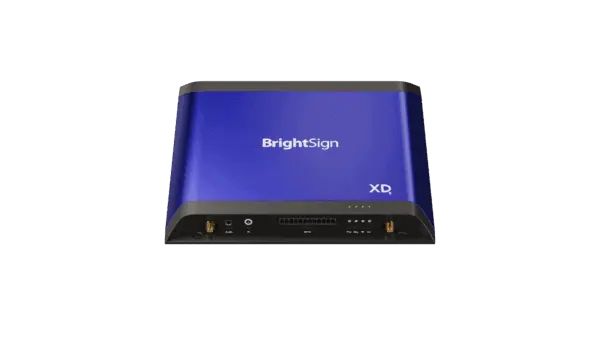
XD235 Sorties
PoE+ Enternet - Gigabit
GPIO - 12 broches de type Phoenix / 8 ports bidirectionnels
3,5 mmAudio : 3,5 mm Sortie audio (analogique ou SPDIF)
Sortie HDMI - HDMI 2.0a
Télécommande IR - Entrée/sortie IR 3,5 mm
XD1035 Sorties
PoE+ Enternet - Gigabit
USB - (x1) Type X, (1) Type A
GPIO - 12 broches
Style Phoenix / 8 ports bidirectionnels
3,5 mmAudio : 3,5 mm Sortie audio (analogique ou SPDIF)
Sortie HDMI - HDMI 2.0a
Port série - Port série 3,4 mm
Télécommande IR - Entrée/sortie IR 3,5 mm
M.2 - Interface PCIe (WIFI et SSD)
Le XC2055 ou le XC4055
Starting at $1200* for XC2055 or $1700* for XC4055
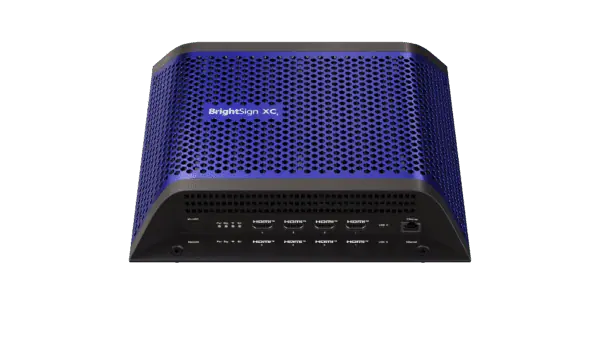
Caractéristiques Les lecteurs multimédias de la série XC5 offrent plusieurs sorties HDMI, ce qui est parfait pour la création de murs vidéo. Cela élimine de nombreux problèmes potentiels et des dépenses supplémentaires en incluant toutes les exigences dans un seul appareil. La gamme XC5 propose des options de lecteur à deux ou quatre sorties, qui vous permettent d'afficher du contenu en 8K ou 4K.
Parfait pour : Idéales pour les vitrines multi-écrans haute résolution à fort impact, les deux versions du XC5 sont conçues spécifiquement pour les murs d'images. Le XC4055 offre une flexibilité maximale, vous permettant de créer des affichages multi-écrans 8K, en utilisant soit l'option de lecteur à sortie unique 8K, soit en connectant quatre écrans 4K via le module à sortie quadruple.
Comme tous les périphériques BrightSign Series 5 fonctionnent exactement de la même manière que les autres modèles BrightSign, vous n'aurez pas besoin d'une nouvelle formation pour les utiliser. Lorsque vous associez ces lecteurs à Signagelive, vous n'avez pas non plus besoin d'investir dans un système de gestion de contenu distinct pour les affichages multi-écrans haute résolution. Avec Signagelive, vous pouvez gérer vos campagnes de murs vidéo 8K et/ou 4K, ainsi que le contenu du reste de votre réseau, le tout à partir de la même plateforme.
Sorties
- 4 ou 2 sorties HDMI (4 sorties pour XC4055, 2 pour XC2055)
- 2 x USB
- GPIO
- En série
- IR
- Gigabit Ethernet
- Sortie audio 3,5 mm (analogique ou SPDIF)
- Antenne Wi-Fi coaxiale préinstallée
BrightSign série 4
BrightSign propose toute une gamme de périphériques. Dans cet article, nous allons aborder chacun d'entre eux et les fonctionnalités qu'ils incluent, ainsi que le moment où vous devriez les utiliser. XT XD HD LS AU (audio uniquement)
Logiciel BSN.Cloud pour la gestion de l'affichage dynamique
As well as hardware, BrightSign features BSN.Cloud software for free with each box. BSN.Cloud allows you to connect to your players via the cloud, manage your devices network and content management and configure your settings to your preference. BSN.Cloud also allows you to select your CMS of choice (content management system) so you can still use the right content management tool for your requirements, whist relying on their hardware. Previously, BrightSign had offered a local player management tool called “Bright Author” which has since been superseded by BSN.Cloud.
With your BSN.Cloud software and BrightSign devices, you’ll then be free to choose the CMS that suits your needs. BrightSign even has it’s more reputable software options included within the BSN.Cloud application for you to select and install within the user interface.
When to use BrightSign?
We’ve been working with BrightSign for many years and by far the most impressive aspect of their devices is the extremely low failure rate. As BrightSign are custom designed Digital Signage players, their custom casing and SSD drives are perfect for the life cycle and intensive use of a Digital Signage player. We’ve received many reports of users having little to no players failing (however there will always be one or two as not every hardware device is treated the same).
BrightSign players are suitable for nearly every environment including Retail, QSR, Stadiums, Corporate workspaces, and The Automotive industry, but to name a few, you should MOST IMPORTANTLY consider the content you wish to display before selecting your player.
New installations and upgrading your Digital Signage
BrightSigns players can easily be slotted behind an existing screen which makes them perfect for upgrading your Digital Signage environment. If you’ve already installed screens on site and you are tired of costs and disruption of existing hardware failure, BrightSign players are ideally suited.. with BrightSign Player pricing from $250.00 to $340.00 USD for one device) you’ll end up saving money over replacing non-signage focused hardware such as Raspberry Pi devices.
When to use BrightSign?
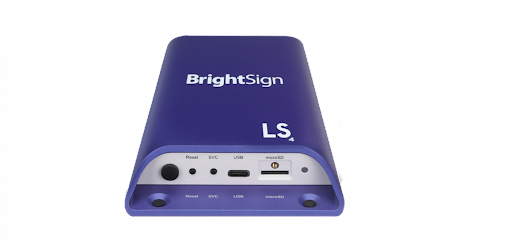
LS424 Player (Starting at $300*)
Caractéristiques
- H.264 compatible
- 1080p60 single decoder
- Entry level HTML5
- IP streaming
- Multi-zone support
- B-deploy
- Remote snap
Jargon busted
The LS range are the smallest form-factor BrightSign players that, as always, come with commercial grade suitability. Being H.264 compatible means that it can play most video and image files you’re probably familiar with. Featuring the ability to run 1080p60 (60 being frames per second) video means it’s not designed to display 4K content, however, you’d also need a 4K screen and the 4K content to make the most out of that feature.
Entry level HTML5 support means it will work with displaying simple web-pages, however, as it’s entry level, some more sophisticated websites may be slow and sluggish, especially if the site is poorly optimised or features a huge amount of motion. IP streaming allows you to display live content via the player. This player doesn’t feature HDMI input so your IP stream will need to be delivered via a URL.
Multi-zone support will almost certainly be a want for many Digital Signage displays being used today. This gives you the ability to split your screen into multiple zones of content that run at the same time in a myriad of designs. Do bear in mind that this player doesn’t support multi-video playback so if you’re looking to display 2 video files AT THE SAME TIME this isn’t the player for you. BrightSigns handy B-Deploy feature is a huge time saver and allows you to set up hundreds of players at a time rather than one-by-one. Something to consider if you’re looking to set these devices up yourself.
All BrightSign players have B-Deploy and Navori is capable of supporting large-scale deployments and remote device management. Remote monitoring features also allow you to view proof-of-play and screenshots, giving you peace of mind that your content looks the way it should, even when you’re away from the player’s location.
HD224 player (Starting at $350*)
Caractéristiques
- H.264 compatible
- Mainstream HTML5
- IP streaming
- Multi-zone support
- B-deploy R
- Remote snap
- True 4K
- Extended thermal
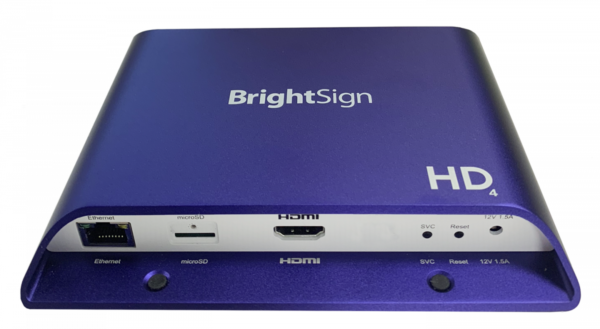
We’re not going to rehash the above description as the HD series does have some of the same features as the LS model, however, the HD product is split into 4 options.
HD244 Standard I/O Player
HD1024 Expanded I/O Player
Built in SoC OPS Product Line
Let’s start with the Standard player…
As well as the LS features, the standard player comes with an improved Mainstream HTML5 player. This means it will be able to display full screen or modular HTML5 assets alongside Full HD or 4K videos without a problem. It could still struggle with some of the more complex HTML5 like pinch, zoom, swipe effects. The biggest leap in technology from the LS player is the 4K playback, allowing you to display 4K and full HD single video decoding. You still can’t display multiple videos at the same time though; for that you’re going to need an XD BrightSign. Extended thermal means that your BrightSign can live in a warmer environment comfortably. BrightSign notes this max temperature to be 70 degrees so it’s perfect for those warmer working environments like restaurants and kitchens.
HD1024 Expanded I/O Player
The Expanded player features all of the above, however, it also comes with an additional USB2.0 option (type A) and serial to fully engage your audience. This feature is going to be important if you’re looking to include a device for interactivitylike Nexmosphere.
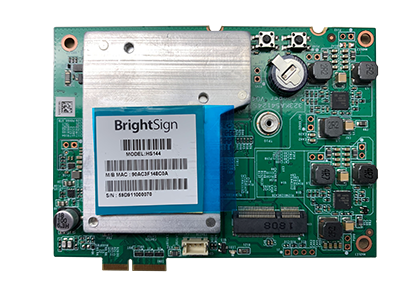
Built in SoC
You’re probably not going to need the HS124 or HS144 versions of this hardware unless you’re building out 100’s of devices and want your BrightSign hardware INSIDE your screen, however, if you are looking at building a fully custom screen with inbuilt hardware, BrightSign can accommodate.
XD234 player (Starting at $475*)
Caractéristiques
- H.264 compatible
- Advanced HTML5
- IP streaming
- Multi-zone support
- B-deploy
- Remote snap
- True 4K
- Extended thermal
- Mosaic mode
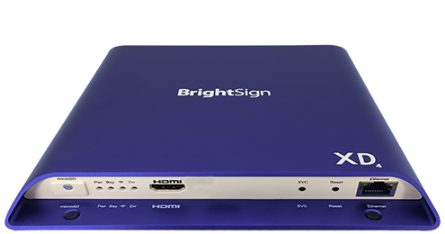
As well as all of the features the HD brings to the table, the XD range adds Mosaic mode and Advanced HTML5. This gives you the freedom to display multiple video files concurrently. The Advanced HTML5 feature means that even more complex HTML5 sites can be played, including those with more animation. The XD range also has an optional WiFi module (sold separately) and supports gigabit ethernet networking for the fastest content download possible.
There are two versions of the XD range. The XD234 Standard I/O Player and the XD1034 Expanded I/O player, which like the HD range, features USB options. In this case, Dual USB (Type A and type C) and serial control for engaging interactive options.
These players are perfect for those that need versatility. The dual ability to play video is especially useful if you’re going to be displaying a myriad of content across a broad range of locations.
XT244 player (Starting at $575*)
Caractéristiques
- H.264 compatible
- Enterprise HTML5
- IP streaming
- Multi-zone support
- B-deploy
- Remote snap
- True 4K (dual)
- Extended thermal Mosaic mode
- POE (power over ethernet)
The XT line is the most powerful range available. The Enterprise HTML5 means it can tackle even the most complex animation and designs while the True 4K dual video feature will allow you to display 2 x 4K pieces of content at the same time. Bear in mind that most screens are 4K today, this means that you could run two 4K screens from one device (with some kind of matrix in between. The XT players also feature POE (Power Over Ethernet) which means the entire device can be powered by ethernet which removes one more cable you need to manage.
The XT range also includes XT1144 Expanded devices which feature Dual USB (like the XD devices and (importantly) an HDMI Input port, meaning that you can import anything via HDMI. These devices are often used to push live TV in a zone of your screen while utilising the other zones for promotional content.
Finally, the XT1144-T Expanded I/O player is almost identical but has been approved and applies to the Trade Agreement Act (TAA) so can be used by the Federal Government in the USA. If you’re still not sure which hardware device is for you, BrightSign has built a handy configurator.
Features you need and the hardware you require
The above hardware breakdown is great to understand the nuts and bolts, but let’s take some of our usual customer requirements and break down how to validate the hardware required to achieve this.
Customer example 1
Kevin is responsible for the corporate communications across a range of sites. He’s been tasked to set up Digital Signage with the reception areas (to feature live TV) and in several locations on each floor that will deliver key metrics for the company such as dashboards, statistics, new company information and content. Kevin has considered the assets that will need to be managed and has agreed with the team that their required content items are…
- Image files
- Video files
- HDMI input (for live TV)
- Items such as weather, clock and news widgets from the Marketplace
After review, Kevin notices that only 10 of the total 100 devices require the HDMI output.
Decision
Kevin is going to need at least ten XT244 devices as these have the HDMI input functionality they are looking for to create this live TV combination, however, they can opt to go for LS424 devices for the rest of their roll-out as these devices require less robust usage. It should be considered that for future-proofing, they may opt for an XD ou HD model, just in case they require further features at a later date from their devices.
Additional hardware items to consider around BrightSign
Micro SD card
Your BrightSign player (regardless of the one you choose) will require an SD card to store the content you’re looking to display. Most opt for a 32GB card that has ample storage for most projects but consider this when you’re discussing your content structure.
WIFI/Bluetooth modules
BrightSign does offer an additional module to allow for WiFi or Bluetooth on the Series 3 and 4 devices at an additional cost of $55 per device. This will also require installation by yourself or the reseller you are purchasing from.
GPIO terminal
The GPIO terminal (general purpose In/Out) is an available option for the HD4, XD4, XT4, HD3, XD3, XT3 models and will allow you to trigger content with GPIO devices. This is something you should consider, depending on the external hardware you’re looking to use to trigger your content.
All in one options
Both Mimo monitors et Le thon rouge create custom monitors from 8” screens for corporate workspaces (perfect for room booking) and larger screens. They have created a range of screens with BrightSign running inside the device. This is ideal if you’re looking for an all-in-one device, more similar to an SoC (System on Chip) screen.
Customer example 2
Linda is looking to create a super engaging product experience in her retail store. She wants the clients to be able to come and interact with products on display and learn more about the product when they lift the item from the shelf. This can be achieved using a Nexmosphere device, however, she’s going to need a way of connecting this to her player of choice and a robust player that can tackle a range of different content types.
Decision
Linda can opt for anything from the HD, XD or XT range, however, it’s important that she chooses the “extended” model as this features the USB input that will be imperative to creating this engaging experience.
Conclusion
Both customer examples have their own challenges, however, the key to finding the answer always starts with the content requirements. Once you know what you’re looking to display, you can start to split your Digital Signage requirements and pick the hardware that’s suitable for requirements.
Additional hardware items to consider around BrightSign
Micro SD card
Your BrightSign player (regardless of the one you choose) will require an SD card to store the content you’re looking to display. Most opt for a 32GB card that has ample storage for most projects but consider this when you’re discussing your content structure.
WIFI/Bluetooth modules
BrightSign does offer an additional module to allow for WiFi or Bluetooth on the Series 3 and 4 devices at an additional cost of $55 per device. This will also require installation by yourself or the reseller you are purchasing from.
GPIO terminal
The GPIO terminal (general purpose In/Out) is an available option for the HD4, XD4, XT4, HD3, XD3, XT3 models and will allow you to trigger content with GPIO devices. This is something you should consider, depending on the external hardware you’re looking to use to trigger your content.
All in one options
Both Mimo monitors et Le thon rouge create custom monitors from 8” screens for corporate workspaces (perfect for room booking) and larger screens. They have created a range of screens with BrightSign running inside the device. This is ideal if you’re looking for an all-in-one device, more similar to an SoC (System on Chip) screen.
Conclusion
If you’re looking for a bullet-proof media player for existing or new screens, look no further than a BrightSign device. Although they aren’t the cheapest hardware in the market, they are by far, the most robust and reliable for serious commercial use. BrightSign’s extensive range of players will enable you to select the device that works best for you, without over-delivering on features and keeping the cost down. Feel free to mix and match the devices you need to create the most cost effective Digital Signage network possible.
BrightSign also supports a range of trigger items and a whole host of beneficial features to allow you to manage your network remotely. Navori QL provides advanced content management, automation, proof-of-play reporting and seamless integration with BrightSign devices, enabling you to configure, deploy, activate and manage hundreds of devices quickly and efficiently.
To learn more about Navori solutions and to discuss your Digital Signage requirements, please get in contact with us.
*Pricing is indicative and may vary depending on region, reseller and configuration.

